
Hammer AI is a desktop AI character-chat application associated with running large language models locally. Jan’s local-AI directory describes it as an Ollama-based interface for Windows, Mac, and Linux. Its publisher maintains a public download repository. Before choosing it, separate four questions: which installer fits your computer, where the selected model runs, what data the application handles, and what the current service costs. Local inference alone does not answer all four. [1–3]
A chatbot’s interface and the model generating its replies are different things. Understanding that distinction helps you evaluate Hammer AI without assuming that every feature is offline, every model fits your laptop, or a public GitHub download makes the entire application open source.
What is Hammer AI, and what is it used for?
Hammer AI is described in Jan’s curated local-AI directory as a character-chat interface that uses Ollama underneath. A character-chat interface provides instructions and conversational context that shape a model’s responses—for example, a fictional guide helping you develop a story. The underlying language model produces the text; the application organizes the interaction. [3]
That makes character writing and conversational experimentation reasonable evaluation tasks. It does not establish that Hammer AI is an enterprise agent platform, a verified research engine, or a substitute for professional judgment. Fluent dialogue can contain invented facts, inconsistent character details, and unsupported claims.
For a broader process that includes fact-checking and human review, start with our practical AI workflow guide. Choose the task first, then decide whether a character-focused interface suits it.
Hammer AI at a glance: what we could verify
| Question | Evidence | What it does not establish |
|---|---|---|
| Is there a publisher-linked download source? | The hammer-ai GitHub profile links to HammerAI.com, and its hammerai repository says it holds the product’s releases. [1–2] | An independent security audit |
| Which release was marked latest? | v1.0.78, published October 15, 2026, was marked latest when reviewed. [2] | That no newer release will appear after this review |
| Are desktop packages available? | The release lists Windows, Apple Silicon macOS, and x86_64/amd64 Linux packages. [2] | Every OS version or CPU architecture is supported |
| Is local character chat part of its positioning? | Jan’s directory describes an Ollama-based, offline, free-to-chat interface. [3] | Current commercial limits or every feature’s network behavior |
| Is the complete app open source? | The visible release repository contains a README and security policy. | That the desktop application’s complete source and license are published there |
Hammer AI download for Windows, Mac, and Linux
Begin with the publisher profile and its linked latest release. The table below records filenames in the reviewed release; it is not a permanent installation specification.
| Platform | Observed package | Check before installing |
|---|---|---|
| Windows | HammerAI-1.0.78.Setup.exe | Current Windows requirements and your CPU compatibility |
| Apple Silicon Mac | HammerAI-1.0.78-arm64.dmg | The listed DMG is arm64; do not assume it supports Intel Macs |
| Debian-family Linux | hammerai_1.0.78_amd64.deb | Distribution compatibility and amd64 architecture |
| RPM-based Linux | HammerAI-1.0.78-1.x86_64.rpm | Distribution compatibility and x86_64 architecture |
| Linux Flatpak | io.atom.electron.HammerAI_stable_x86_64.flatpak | Flatpak support and x86_64 architecture |
Use the publisher’s current instructions for installation. These package names do not establish availability of an Android APK, iPhone application, browser edition, or Intel Mac build. A third-party “Hammer AI download” page is not equivalent to a publisher-linked release.
The reviewed asset list exposes SHA-256 digests. A matching digest can confirm that a downloaded file matches the listed asset; it does not prove the software is vulnerability-free. Review the publisher, filename, architecture, and operating-system prompts together.
Does Hammer AI work offline? Understand local versus cloud inference
Local inference means the selected model generates responses on your machine. Cloud inference sends the work to a remote service. Downloading a desktop application does not, by itself, tell you which path a particular conversation uses.
Jan’s directory positions Hammer AI as an offline local-chat tool. However, we did not test the current application or inspect all its settings. Treat offline operation as something to verify for your chosen version, model, and workflow, rather than a guarantee covering every feature. [3]
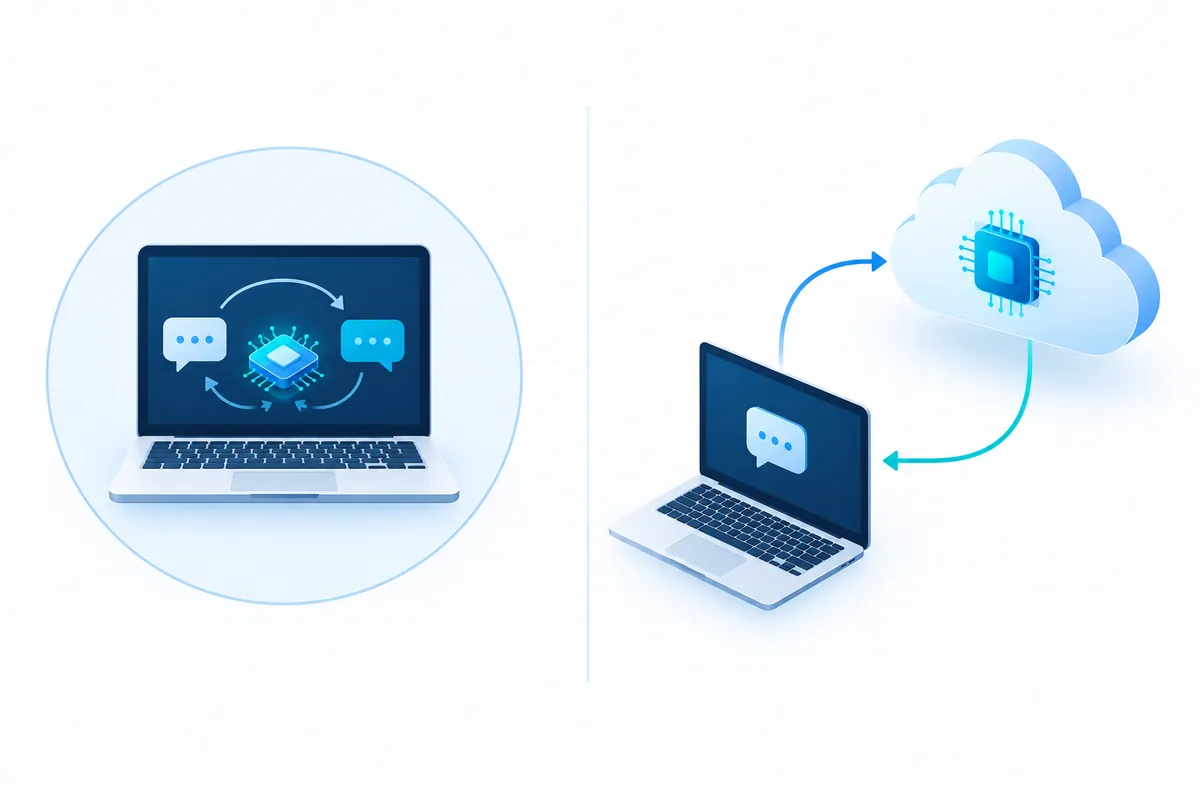
Ollama’s own documentation explicitly distinguishes local models from cloud-hosted models and documents a local-only configuration. Those are Ollama controls; they should not be presented as proof that every application using Ollama has identical behavior or exposes the same settings. [4]
The application installer and model weights are separate downloads. You may need an internet connection to acquire software, a model, or updates before a local chat can work offline. Features that depend on remote services can still require connectivity.
- Install the appropriate application package and obtain the model required for your intended local workflow.
- Use a harmless test prompt and confirm which model or endpoint is selected, where the application exposes that information.
- Disconnect from the network and repeat the test after setup is complete.
- Record which functions continue to work and which request connectivity.
This checks whether that workflow can function offline. It is not a comprehensive privacy audit: a successful disconnected test does not establish what happens when the application reconnects.
Is Hammer AI free? Separate chat access from total cost
Jan’s directory describes Hammer AI as free to chat. We could not verify its current pricing page, account requirements, subscription options, or usage limits. Check the official product website before assuming every model or service is free, unlimited, or available without an account. [3]
Local use also has costs outside a subscription: disk space for model files, memory, electricity, download bandwidth, and your time maintaining the setup. If a workflow uses a paid cloud provider, evaluate those charges separately. Avoid comparing a locally running model with a cloud service solely by the application’s download price.
Is Hammer AI private and safe?
Local inference can reduce the need to send prompts to a remote model provider. It does not automatically establish how the whole application handles accounts, telemetry, crash reports, saved conversations, backups, or optional services.
The public repository includes a security-reporting policy, but that policy is not an independent audit or a statement of all data-processing practices. We did not verify the current product privacy policy and cannot conclude that all application data remains on the device. [6]
- Model location: identify the execution location for the actual conversation, not just where the app is installed.
- Storage: check how chat history is saved, exported, and removed, including any device backups you use.
- Permissions: review access requested by the application and any connected services.
- Data suitability: start with fictional or public material while assessing the workflow.
- Output review: check factual statements against original sources before relying on them.
For workplace use, connect the evaluation to a named owner, permitted data, and clear acceptance criteria. Our AI use-case risk assessment guide explains how to record those decisions without treating one overall score as proof of safety.
Hammer AI system requirements: what actually affects performance?
We did not verify publisher-specified minimum RAM, GPU, VRAM, or operating-system versions for the current app. The existence of an installer does not answer those questions. Check the official requirements for your release and the requirements of your chosen model separately.
| Factor | Why it matters | Practical evaluation |
|---|---|---|
| Model size and quantization | Weight size and numerical precision affect memory needs and output behavior. | Start with a supported model that fits your available resources. |
| Context window | Processing longer conversation histories adds memory and computation. | Compare a short chat with the longer context your task needs. |
| RAM and VRAM | Insufficient available memory can prevent loading or create severe slowdowns. | Check system usage while loading and generating. |
| CPU, GPU, and runtime support | Acceleration depends on the model runtime and supported hardware. | Verify actual compatibility rather than assuming any GPU will help. |
| Storage and downloads | Application files and model files occupy separate space. | Leave capacity for both the model and updates. |
A smaller quantized model may be more practical than a larger one that repeatedly exhausts memory. It may also answer differently. Model fit, instruction-following, consistency, and acceptable response time all matter; model size alone does not determine the best choice.
How to evaluate your first Hammer AI character chat
Use a repeatable, non-sensitive task. The prompt below is an original example to adapt wherever the application lets you provide character instructions or conversation context; it does not depend on a particular button or menu name.
You are Mira, a patient fictional guide in a floating city.
Help me plan a short scene for a general audience.

Established facts:
- The city has no private cars.
- Mira repairs musical instruments.
- The visitor is searching for a missing notebook.

Write no more than 150 words.
Keep those three facts consistent.
If a necessary detail is missing, ask one brief question.
Do not present fictional details as real-world facts.
Run the same task more than once. Then ask a follow-up that tests whether the model preserves the established facts. Save your observations rather than treating one appealing answer as a benchmark.
| Check | What to record |
|---|---|
| Constraint following | Did the answer respect the length and requested task? |
| Character consistency | Did it preserve the occupation, setting, and visitor’s goal? |
| Clarification | Did it ask a useful question when information was missing? |
| Responsiveness | Was the wait acceptable on your computer and selected model? |
| Local/offline behavior | Which tested functions worked without a connection? |
| Maintenance | Could you identify the app/model versions and repeat the setup? |
Hammer AI model not loading or responding slowly: where to start
The following are general local-model troubleshooting steps, not a verified list of Hammer AI error messages or menu instructions.
- The installer will not open: check the operating system, package type, CPU architecture, and publisher instructions. Do not assume the arm64 Mac download fits an Intel Mac.
- The model will not load: check that its download completed, sufficient storage and memory are available, and the model is supported by the chosen runtime.
- A reply is slow: compare a shorter conversation and a smaller supported model. Review memory pressure and acceleration compatibility.
- Offline chat fails: distinguish a missing model download from a selected remote service or another network-dependent feature.
- Replies lose the character: simplify conflicting instructions and evaluate the model with a shorter, explicit character brief.
When asking for support, include the application version, OS, CPU architecture, model name, a reproducible harmless prompt, and the exact error. Remove private conversation content and credentials from any logs you share.
Hammer AI vs ChatGPT and local AI alternatives
Compare the workflow you need. A locally executed model and a hosted assistant can differ in setup effort, available capability, network requirements, and who processes the request. “Desktop” and “cloud” are execution choices, not universal measures of intelligence or privacy.
| Option | Why evaluate it? | What to verify |
|---|---|---|
| Hammer AI | A character-chat interface positioned around local models. [3] | Current app features, model support, data policy, and compatibility |
| A hosted assistant such as ChatGPT | Consider when a managed online service fits the task. | The actual plan’s capabilities, data controls, limits, and cost |
| Jan | Its documentation describes a desktop interface for local models with optional cloud integration. [5] | Which execution mode and connected provider you select |
| Ollama directly | Evaluate when you want to work with the model runtime rather than a character-focused interface. [4] | Local versus cloud model selection and the setup your workflow needs |
This is not a head-to-head benchmark. We did not measure speed, model quality, pricing, or privacy outcomes across these products. Choose a representative task and compare the complete workflow, including review and setup time.
Is Hammer AI open source?
A public GitHub release page is not sufficient evidence that an application is open source. The reviewed HammerAI repository explicitly says it holds releases; its visible files are a README and a security policy. GitHub’s automatically generated “Source code” archives describe that repository’s contents and should not be assumed to contain the desktop application’s complete source.
If source availability matters, look for the actual application source tree and a license covering it. Similarly, a model’s license is separate from the application’s license and may have its own conditions.
Frequently asked questions about Hammer AI
What is Hammer AI?
Hammer AI is described in Jan’s local-AI directory as an Ollama-based desktop character-chat interface. Its publisher maintains a public release repository with desktop installers. The application interface and the model producing responses are separate parts of the workflow.
Is Hammer AI free to use?
Jan’s directory describes it as free to chat. Current subscription options, account requirements, usage limits, and model-service charges were not verified in this review. Check the official pricing information before assuming every feature is free or unlimited.
Can Hammer AI work without internet?
The directory describes local/offline operation. A local workflow generally needs the application and model downloaded first. We did not test the current app; verify the selected model and functions offline rather than assuming every feature works without connectivity.
Where can I download Hammer AI for Windows or Mac?
Use the publisher-linked hammer-ai/hammerai GitHub releases. The reviewed v1.0.78 release includes a Windows Setup.exe and an arm64 Mac DMG. Check the latest release and compatibility instructions; an arm64 package does not establish Intel Mac support.
Is Hammer AI available for Linux?
The reviewed v1.0.78 release lists amd64 DEB, x86_64 RPM, and x86_64 Flatpak packages. Confirm that your architecture and distribution match the current package requirements.
Does local AI mean my conversations are completely private?
No. Local inference describes where a model runs. Application telemetry, saved history, optional remote services, backups, and device access are separate issues. This review did not verify Hammer AI’s current privacy policy.
How much RAM does Hammer AI need?
We did not verify a current publisher-specified minimum. Memory requirements depend on the application, model, quantization, context length, runtime, and available acceleration. Check both the app’s requirements and the chosen model’s needs.
What are alternatives to Hammer AI for local AI chat?
Jan documents a desktop interface for local models with optional cloud connections. Ollama provides a model runtime that can be used directly or through other interfaces. Compare the interface, model support, execution mode, and data handling you need.
Sources and editorial method
Reviewed October 21, 2026. Installer details are a dated snapshot, not a promise of future availability. The evaluation prompt, worksheets, and explanations are original DailyVertex material. We did not install Hammer AI, benchmark its performance, or independently audit its network behavior.
- HammerAI publisher profile — links to the desktop product website.
- HammerAI v1.0.78 release and release repository — distribution purpose, release date, installer names, and asset digests.
- Jan’s awesome-local-ai directory — secondary description of HammerAI’s character-chat, Ollama, and offline/free-to-chat positioning.
- Ollama FAQ — local/cloud distinction, local-only configuration, and runtime considerations. These are Ollama-specific documentation claims.
- Jan documentation — local models and optional cloud integrations.
- HammerAI security-reporting policy — vulnerability-reporting process, not a privacy audit.